One Take Studio is live on iPhone
Import a beat, hit record, and get a vocal idea out of your head before it disappears.
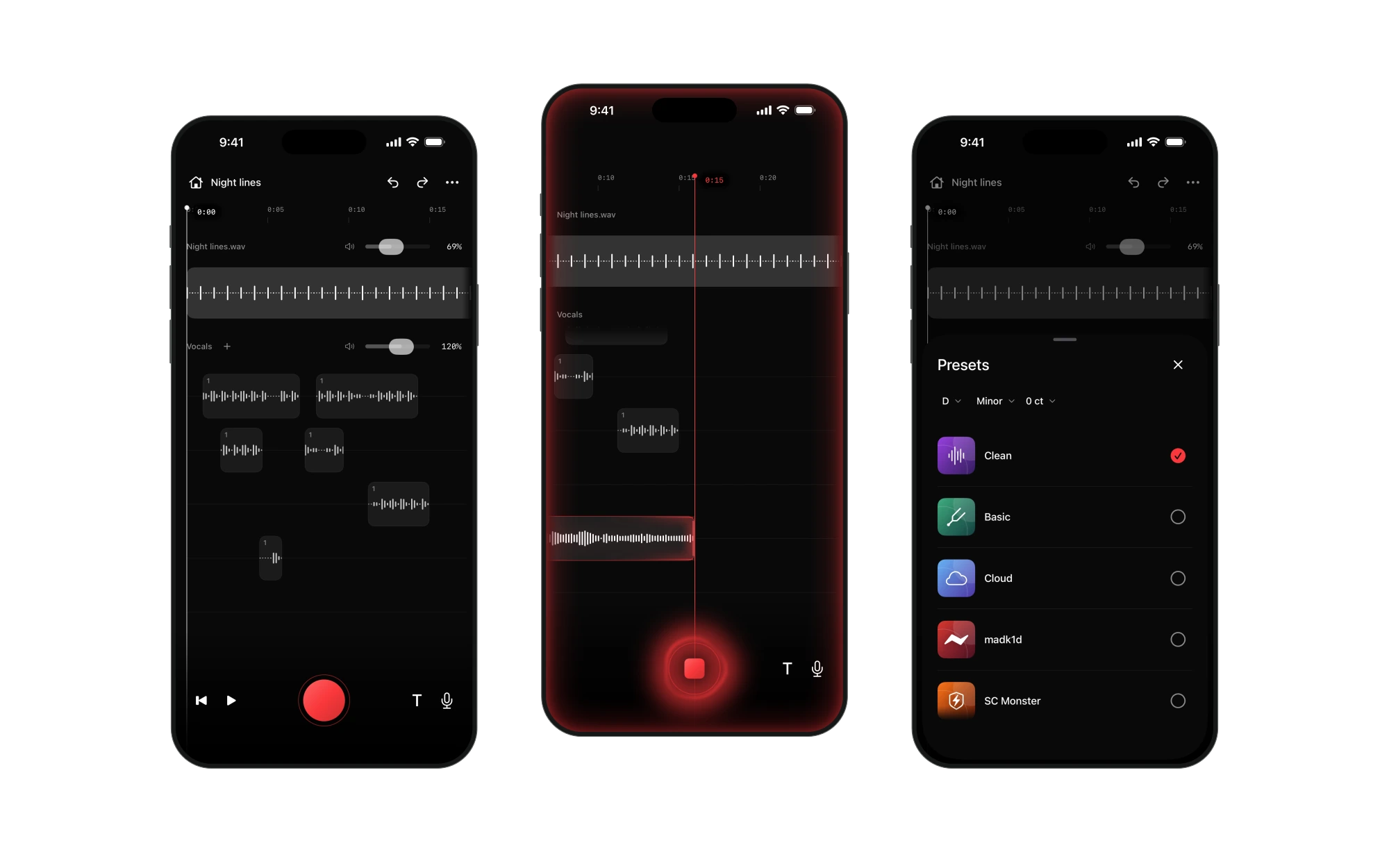
A vocal idea can be hard to hold onto while you set up a session. I wanted to make it possible to try a hook over a beat from wherever you are, using the phone you already have. I kept thinking about how easy it is to start editing a video in CapCut. I wanted that feeling for recording a song.
Start with the record button
Bring an instrumental, hit Record, and start singing. I built the main screen around that one action. You can keep lyrics over the timeline, monitor your voice through headphones, and try vocal effects while you find the feel of the take.
The app can detect the key of your beat on the phone. Vocal presets combine pitch correction, EQ, and compression, and you can blend effects or clean up background noise while keeping the original recording.
A demo now, tracks for later
When you have a take you like, send someone a mixed MP3. If you want to keep producing, export a ZIP with aligned WAVs, including dry and processed vocal tracks and the beat. Drop them into another editor at the beginning of the timeline and they’ll line up.
The iPhone version is out now. I’m planning an Android version. If you’ve got a beat saved on your phone, this is a good excuse to finally record something over it.